
Manual → Start Billing in 30 Minutes → Patient Quick Setup
Patient Quick Setup – Demographics
This step creates the patient record so you can bill.
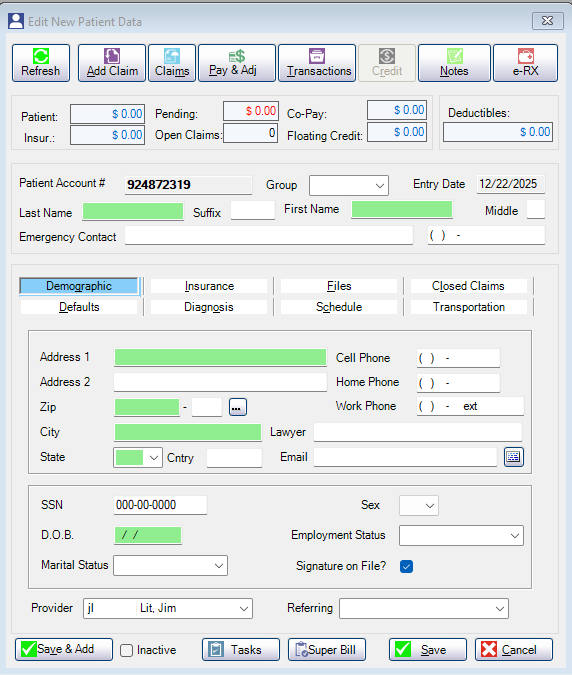
For your first claim, you only need the Demographic screen.
Green fields are required.
Before You Start (Good to Know)
- The first letter auto-capitalizes
- You can tab through every field
- You can complete this screen without using the mouse
- Accuracy matters more than filling everything in
What to Enter (Demographic Tab)
Enter the following:
- Last Name / First Name
- Date of Birth
- Sex
- Assigned Provider
- Address
- Enter ZIP code first
- City and State auto-fill from the ZIP database
- If multiple cities appear, click the three dots (…) and select the correct one
- Your selection becomes the default next time
Green fields must be filled before you can save.
What You Don’t Need to Touch
Patient Account Number
- AllMed PM assigns this automatically. You can change it later if needed.
- SSN
- Employment status
- Marital status
- Emergency contact
- Notes, files, scheduling, or history tabs
Save the Patient
Click Save once required fields are complete.
AllMed PM handles the rest.

Copyright 2026 AllMed PM LLC, all rights reserved.