
Manual → Start Billing in 30 Minutes → Patient Insurance Details
Enter Patient Insurance Details (First Claim Only)
At this point:
- The patient exists
- The insurance company exists
- Now you just need to attach the patient’s insurance information
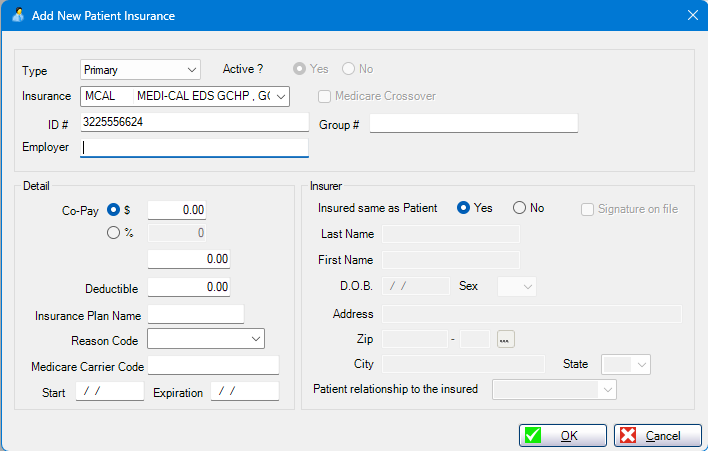
You only need the top section of this screen.
What to Fill Out (Top Section Only)
Type
- Leave as Primary
Active
- Leave as Yes
Insurance
- Already selected from the previous step
ID #
- Enter the member / subscriber ID
- This is the most important field on this screen
Group #
- Enter only if the insurance card shows one
- Otherwise, leave blank
What You Can Skip for Now
Do not fill out:
- Co-pay
- Deductible
- Plan name
- Reason codes
- Medicare carrier code
- Start / expiration dates
- Insured details (leave “Insured same as Patient” set to Yes)
None of these are required to create or view a claim.
Save and Continue
- Click OK
The insurance is now:
- Attached to the patient
- Ready for claims
- Fully usable
Why This Step Matters
Claims pull the Insurance ID from here.
If this is missing, claims will reject.
All other insurance details can be added later.
Where You Are Now
You have completed:
- Patient
- Insurance company
- Patient insurance details
You are now ready to:
Create the Claim
This is the final setup step before billing.