
Manual → Start Billing in 30 Minutes → Company Information
Company Information
What You Need to Fill Out for Successful Claims
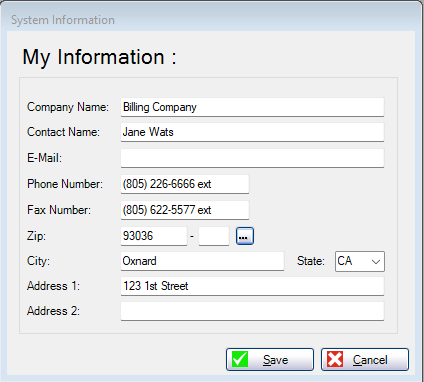
Before you create your first claim, you must complete Company Information.
This section is required for electronic claims and is also used on patient statements if you choose to send them.
This is not provider information.
This is the biller or billing company — the people doing the leg work for electronic claims.
Why This Matters
This information is sent to the clearinghouse with every electronic claim.
It identifies who is doing the billing, not the provider or place of service.
This information is also used on patient statements as the return address for payments.
If checks should be sent somewhere other than the provider’s location, this is where that is defined.
Setting this correctly is critical when the billing address is different from the doctor’s office or place of service.
You only need to set this up once.
What to Enter
- Company Name
- Contact Name
- Email Address
- Phone Number
- Address, City, State, Zip
- Fax Number (optional)
Important Notes
- Do not enter provider or doctor information here
- Do not leave fields blank to “come back later”
- This information feeds both electronic claims and patient statements
Save and Continue
After entering the information, click Save.
You are now ready to move on to Provider setup, where claims actually come to life.

Copyright 2026 AllMed PM LLC, all rights reserved.